

A new retrofit programme has been awarded.
Hundreds, perhaps thousands, of properties need to be assessed. Delivery targets have been agreed, assessors and surveyors need to be mobilised, residents must be contacted and the housing association or local authority expects clear, accurate reporting from the outset.
Before any technical assessment takes place, the operational challenge has already begun.
The property list arrives.
It may contain addresses, client references, tenure information and other details needed to begin delivery. That information then has to be organised, divided into projects, allocated to teams and turned into a workable programme of resident contact and appointments.
On a smaller project, this may be manageable through a spreadsheet.
At scale, it can quickly become fragmented.
One spreadsheet holds the original property list. Another is created for appointment booking. A separate tracker records assessor allocations. No-access visits are added to another document, while customer contact notes are held in emails, individual call logs or within the knowledge of particular team members.
As the programme gathers pace, each spreadsheet begins to tell a slightly different version of the same story.
That is where operational visibility can begin to disappear.
Starting with one connected property record
With RetrofitOS, large property lists can be imported in batches directly into the Property Portal.
Rather than creating every home individually or rebuilding the client’s data across multiple systems, hundreds or thousands of properties can be established within the programme at the outset.
From that point, each property begins its own visible journey through the project.
It can be assigned to the correct workstream, linked to the appropriate client or internal reference and progressed through the required delivery workflow.
The programme does not begin as a collection of disconnected spreadsheets.
It begins with a structured property record that the relevant delivery teams can work from together.
This creates the operational foundation for everything that follows.
The first contact with the resident
Once properties have been imported, the focus moves to resident engagement.
The people responsible for booking appointments begin contacting customers, often making several attempts before an assessment or survey can be arranged.
Those interactions matter.
A resident may prefer a particular day. They may require additional notice, have accessibility requirements or need reassurance about what the assessment involves. They may have previously spoken to someone else within the programme and expect that conversation to have been recorded.
Within RetrofitOS, contact attempts and appointment notes can be recorded directly against the property.
The booking team can document when contact was attempted, what was discussed, whether a message was left, why an appointment could not yet be arranged and what should happen next.
This creates a continuing history of resident engagement.
When another team member accesses the property, they do not have to search through emails or ask who last spoke to the resident. They can see the information already captured and continue the conversation with the right context.
For the resident, that creates a more joined-up and professional experience.
For the delivery team, it removes the uncertainty that comes from important customer information being held in different places.
Turning a property list into a live programme
As appointments are confirmed, they can be issued in bulk to assessors, surveyors and other field-based personnel.
What started as a large property list begins to become a live delivery programme.
Project teams can distribute work across individuals, geographical areas and delivery periods while retaining central visibility of what has been assigned.
Assessors can see where they are expected to attend, while project managers can understand how the available resource has been allocated.
The information recorded by the appointment-booking team can travel with the property, giving the assessor or surveyor greater context before arriving at the home.
This connection between the booking process and the site visit is important.
Without it, the assessor may be working from an isolated appointment sheet with limited understanding of the resident’s previous conversations, access requirements or concerns.
With a connected record, the customer journey does not restart each time responsibility passes from one person to another.
When the appointment does not go to plan
Not every scheduled visit results in a completed assessment.
A customer may cancel. Access may not be available. The resident may not be home or another issue may prevent the visit from proceeding.
In a fragmented process, the assessor may record that outcome on their own spreadsheet and return it to the project manager later.
The project manager may then need to copy the information into a central tracker, send it to the Resident Liaison Officer and manually update the report provided to the client.
Several days can pass between the attempted visit and the person responsible for resident engagement becoming aware that action is needed.
There may also be questions about what happened.
Was the visit genuinely attempted? When did the assessor attend? Was the correct property visited? Was the appointment cancelled in advance, or was there no access when the assessor arrived?
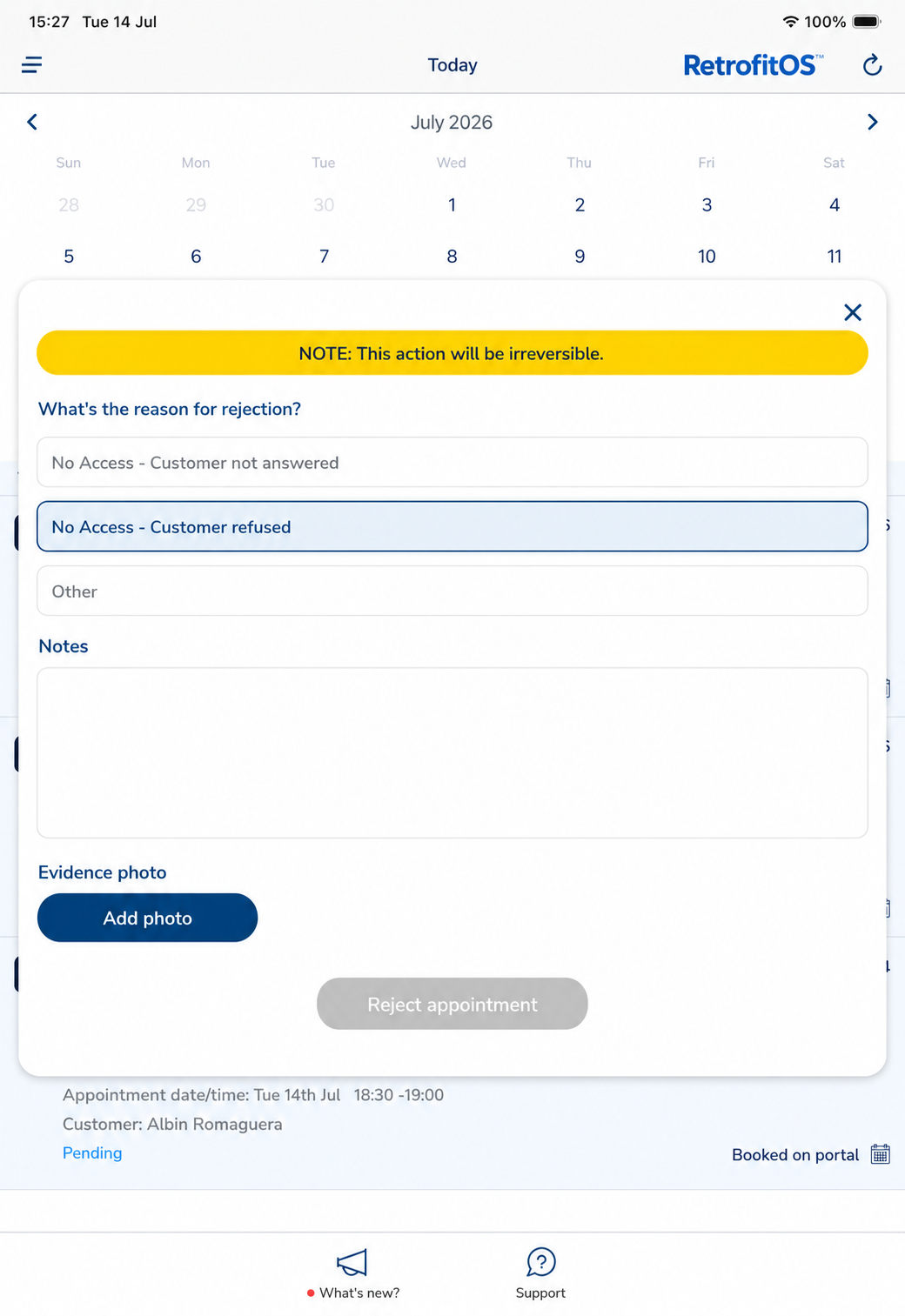
RetrofitOS allows the outcome to be recorded directly against the property at the point the activity takes place.
The assessor or surveyor can record no access, a cancellation, a rescheduled visit or another reason why the appointment could not be completed.
Where required, the workflow can also ask them to upload an image from the property as evidence of their attendance attempt.
This gives the assessor a clear and straightforward way to demonstrate that they attended and genuinely attempted to complete the appointment.
They do not need to rely on recollection or answer questions days later about whether the visit actually took place.
The evidence is already there.
The property record can show who was allocated the visit, when the attempt took place, the outcome, the reason it could not proceed, the supporting image and any notes about what should happen next.
For the assessor, this provides protection and clarity.
For the delivery team, it provides accountability.
For the housing association or local authority, it provides transparency and confidence that the information being reported reflects activity that can be evidenced.
The moment the RLO needs to act
Once an unsuccessful appointment has been recorded, the next stage of the customer journey begins.
The Resident Liaison Officer may need to contact the resident, understand what prevented access and arrange another appointment.
In a spreadsheet-led process, the RLO may not know about the failed visit until an updated tracker has been returned, reviewed and circulated.
By then, the resident may already have received another call from a different team member or the property may have remained inactive for several days.
Within RetrofitOS, the RLO can be given direct access to the relevant information.
They can see the contact history, the scheduled appointment, the outcome recorded by the assessor and any evidence or notes captured at the property.
They can understand what has already happened before speaking to the customer.
That may mean rearranging the visit, offering additional reassurance, identifying a barrier to access or coordinating a more suitable appointment time.
The important difference is that the next action can begin from the latest information rather than waiting for someone to manually update and circulate another spreadsheet.
That visibility helps reduce the time between a failed visit and the next meaningful attempt to progress the property.
From isolated updates to a visible delivery story
As the programme continues, every interaction adds to the story of the property.
The original import shows where the property entered the programme.
The contact history shows the attempts made to engage the resident.
The appointment record shows when a visit was arranged and who was expected to attend.
The outcome shows whether it was completed, cancelled, rescheduled or recorded as no access.
The supporting evidence shows what happened at the property.
The follow-up activity shows how the delivery team responded.
Instead of this information being divided across several trackers, inboxes and organisations, authorised users can see the latest position through the property record.
Project managers gain a clearer understanding of how the programme is progressing.
They can identify where properties are beginning to stall, whether particular areas are experiencing high levels of no access and whether additional booking, assessor or resident liaison resource is needed.
Housing associations, local authorities and other project stakeholders gain greater confidence in the information being presented to them because it is supported by live activity and evidence rather than being manually reconstructed at the end of the week.
Giving technical teams more time to deliver
For Retrofit Coordinator Tom Hardy, the difference is not simply about having better software. It is about reducing the operational noise that can surround a large retrofit programme.
“When a project starts to involve hundreds or thousands of properties, appointment information can quickly become fragmented across spreadsheets, emails and different organisations. Having the property list, customer contact attempts, appointments, outcomes and supporting evidence in one place massively helps because everyone can see the latest position and understand what needs to happen next.
“It also gives assessors a simple way to evidence that they genuinely attended the property. The attempt is recorded there and then, so they are not being questioned later about whether a visit actually took place. At the same time, it gives the delivery team, housing association or local authority full transparency.
“The RLO can see a no-access visit or cancellation and act much sooner, rather than waiting for another spreadsheet to be updated and circulated. That helps keep properties moving and means the wider team can spend less time chasing information and more time delivering the project.”
Operational integrity begins before the assessment
The beginning of a retrofit project is often treated as an administrative stage.
In reality, it is where the integrity of the wider programme begins to take shape.
If property data is fragmented from the outset, if resident contact is poorly recorded or if unsuccessful visits cannot be evidenced, those weaknesses can follow the property throughout the delivery journey.
They affect reporting, resource planning, customer confidence and the ability of project teams to understand why properties are not progressing.
Starting with a connected process creates something different.
It creates a visible and auditable journey from the moment the property enters the programme.
It enables assessors, booking teams, Resident Liaison Officers, project managers, housing associations and local authorities to work from a shared understanding of what has happened and what needs to happen next.
It also gives residents a more consistent experience because the people contacting them have access to the previous history rather than repeatedly starting again.
One small part of RetrofitOS
Batch property imports, appointment allocation, customer contact notes and evidenced no-access reporting are only one small part of the wider RetrofitOS functionality.
The platform is designed to connect the people, processes, property data, technical activity, documentation and evidence involved throughout the retrofit journey.
That journey may continue through assessment, optioneering, design, Retrofit Coordination, installation, quality assurance, compliance and completion.
However, every successful programme needs a strong beginning.
Before the first assessment is completed or the first measure is designed, teams need confidence that properties have been mobilised properly, residents are being engaged, appointments are visible and site activity can be evidenced.
That is what operational control from day one looks like.
Not another spreadsheet.
A connected, transparent and auditable start to large-scale retrofit delivery.